
Displaying Customer Testimonials for Maximum Credibility
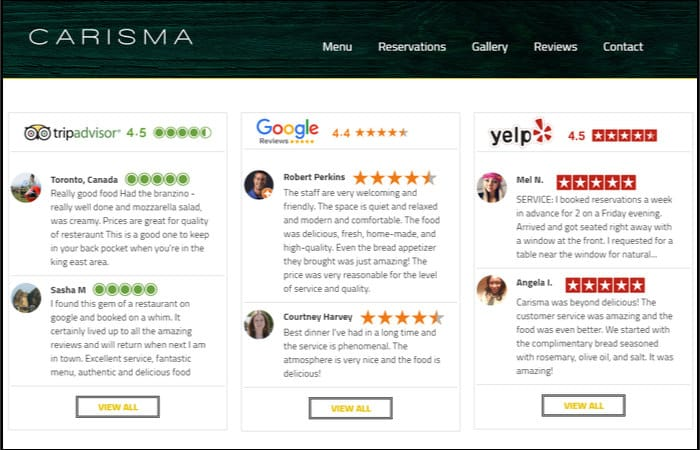
Displaying Customer Testimonials for Maximum Credibility Visitors trust other customers more than they trust you. That's not cynicism—it's human nature. Testimonials provide social proof that your claims are real. But poorly presented testimonials waste their potential. Strategic display maximizes credibility and conversions. At Proton Tech Lab, we design testimonial displays that build trust. Let's explore how to present social proof for maximum credibility. Use Real Names and Photos According to Nielsen Norman Group, testimonials with photos and full names dramatically outperform anonymous quotes. "Great service! – J.S." could be fabricated. "Transformed our business – Jennifer Smith, Marketing Director at Acme Corp" feels verifiable and real. Always ask permission to use names and photos. Most happy customers gladly agree when asked directly after a positive experience. Include Specific Details Vague praise sounds fake. "Great company!" tells visitors nothing. "Increased our conversion rate by 40% within three months" provides concrete evidence. Specific results, timeframes, and outcomes create believable testimonials. When collecting testimonials, ask customers about specific results they achieved. Guide them toward details rather than accepting generic compliments. Match Testimonials to Audiences Different visitors need different proof. A small business owner relates better to testimonials from other small business owners. Enterprise buyers want to see enterprise clients. Place testimonials where relevant audiences will see them. On service pages, show testimonials from customers who used that specific service. Match the proof to the page's purpose. Place Testimonials Strategically Testimonials work hardest near decision points: pricing pages, checkout flows, contact forms. When visitors hesitate, social proof reassures. A testimonial next to your call-to- action addresses doubt at the crucial moment. Don't hide testimonials on a dedicated "Testimonials" page few people visit. Integrate them throughout your site where they support visitor decisions. Use Video When Possible Video testimonials carry extraordinary weight. Seeing and hearing real customers speak creates connection text can't match. Video also proves testimonials aren't fabricated—fake video is much harder to create than fake text. Keep videos short—thirty to ninety seconds. Focus on specific outcomes and genuine emotion rather than polished production. Show Quantity and Quality One glowing testimonial might be a fluke. Twenty consistent testimonials show a pattern. Display enough testimonials to demonstrate consistent satisfaction, not just cherry-picked praise. Star ratings and review counts add quantitative proof. "4.8 stars from 150 reviews" communicates satisfaction at scale instantly. Address Different Concerns Visitors have various objections: price, quality, service, reliability. Collect testimonials that address different concerns. One testimonial about value, another about quality, another about support. Cover the objections your audience likely has. Keep Testimonials Current Testimonials from five years ago suggest you haven't earned praise recently. Rotate in fresh testimonials regularly. Date stamps can help—or hurt—depending on recency. Recent testimonials demonstrate ongoing satisfaction. Design for Readability Long paragraphs of testimonial text get skipped. Pull out key phrases. Use quotation styling that makes testimonials visually distinct. Design should make scanning easy while highlighting the most compelling points. Build Trust That Converts Testimonials are among your most powerful conversion tools—when displayed effectively. Real names, specific details, strategic placement, and thoughtful design transform customer praise into persuasive proof that drives action. Need help displaying testimonials effectively? At Proton Tech Lab, we design websites that build trust and convert visitors. Contact us today to discuss your website. Let's put your social proof to work!