
Turning 404 Error Pages into Positive User Experiences
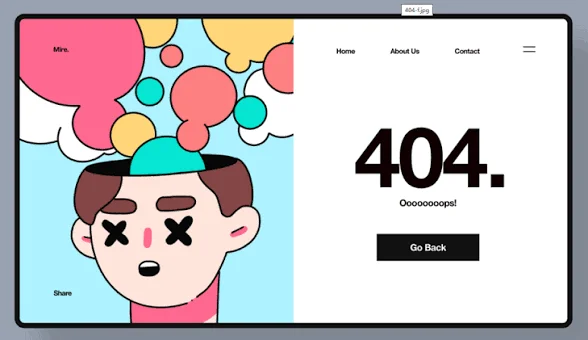
Every website has broken links and missing pages. It’s inevitable. What isn’t inevitable is losing visitors when they hit these dead ends. A thoughtful 404 page transforms frustration into opportunity—keeping users on your site and guiding them toward what they need.
At Proton Tech Lab, we design error pages that help rather than frustrate. Let’s explore how to turn your 404 page into a positive user experience.
Why 404 Pages Matter
According to Google, users who encounter unhelpful error pages often leave immediately. But users who find helpful 404 pages frequently continue browsing. The difference between bounce and retention often comes down to how you handle errors.
Default server error pages are cold, confusing, and offer no path forward. Custom 404 pages show you care about user experience even when things go wrong.
Acknowledge the Problem Clearly
Tell users what happened in plain language. “Page not found” is clearer than “Error 404.” Explain that the page they wanted doesn’t exist, might have moved, or the URL might be wrong. No jargon, no confusion.
A touch of personality helps too. A friendly tone or gentle humor softens the frustration without being annoying. Match your brand voice—playful brands can be playful; professional brands should stay professional.
Provide Clear Navigation Options
Don’t strand users on dead ends. Offer clear paths forward: a prominent link to your homepage, links to popular pages or categories, and your main navigation menu. Give users multiple ways to continue their journey.
Think about where users likely wanted to go and suggest those destinations specifically. If your site has distinct sections, link directly to section hubs.
Include Search Functionality
A search box on your 404 page lets users find what they were looking for without guessing at navigation. If they know what they wanted, search gets them there directly. Pre-populate the search box with keywords from the failed URL when possible.
Maintain Brand Consistency
Your 404 page should look like your website—same header, footer, colors, and design language. Users should know they’re still on your site, not lost somewhere else entirely. Brand consistency maintains trust even during errors.
Add Value When Possible
Some brands use 404 pages as opportunities. Feature popular content, recent blog posts, or special offers. If users can’t find what they wanted, maybe they’ll discover something else valuable. Just don’t overwhelm—help should be the primary focus.

Let Users Report Issues
Include a way for users to report broken links. A simple “Report this problem” link helps you identify and fix issues. Users appreciate feeling heard, and you get valuable feedback about site problems.
Track 404 Errors
Monitor which URLs trigger 404 errors. High-traffic broken links deserve fixes—either restore the content or redirect to relevant alternatives. Analytics reveal patterns that help you prevent future errors.
Test Your Error Pages
Visit a non-existent URL on your site and experience what users experience. Is it helpful? Does navigation work? Does it load quickly? Many sites neglect error pages because developers rarely see them during normal testing.
Turn Errors into Opportunities
Errors happen. How you handle them reveals how much you value users. A thoughtful 404 page keeps visitors engaged, maintains brand impression, and transforms dead ends into new paths. Invest a little attention in your error pages—your users will thank you.
Need help with your website experience? At Proton Tech Lab, we design every page—including error pages—for optimal user experience. Contact us today to discuss your website. Let’s turn every page into a good experience!