
Planning a Website Migration Without Losing Traffic
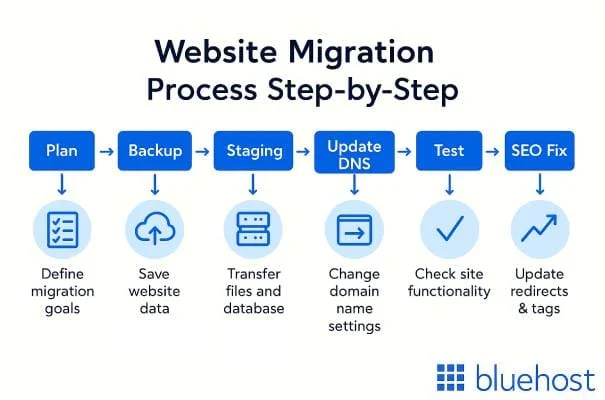
Website migrations are risky. Change platforms, domains, or structure incorrectly and you lose search rankings, break bookmarks, and frustrate users. But migrations done right preserve everything you’ve built while gaining the benefits of your new setup.
At Proton Tech Lab, we execute migrations that protect your traffic. Let’s explore how to plan a migration that preserves SEO and user experience.
Document Everything First
According to Google, successful migrations start with complete documentation. Crawl your existing site to capture every URL. Export analytics data showing traffic to each page. Document current rankings for important keywords. You can’t preserve what you haven’t mapped.
Create a Redirect Map
Every old URL needs a corresponding new URL or redirect. Map old paths to new paths systematically. Use 301 permanent redirects to transfer SEO value. Missing redirects mean broken links and lost rankings.
For sites with thousands of pages, pattern-based redirects handle bulk mappings while individual redirects catch exceptions.

Maintain URL Structure When Possible
The simplest migration keeps URLs identical. Same paths, same structure—just a new platform underneath. When URLs must change, change as little as possible. Every URL change requires a redirect and risks ranking fluctuation.
Test Thoroughly Before Launch
Build the new site on a staging environment. Test every redirect. Verify all content migrated correctly. Check forms, functionality, and integrations. Crawl the staging site to find broken links. Problems found before launch cost far less than problems discovered after.
Time Your Migration Wisely
Avoid migrating during peak business periods. Search engines need time to process changes—rankings may fluctuate temporarily even with perfect execution. Choose low-traffic periods when temporary issues cause minimal impact.
Update Search Console
For domain changes, use Google Search Console’s Change of Address tool. Submit new sitemaps. Monitor crawl errors closely after migration. Search Console reveals problems search engines encounter with your new setup.
Monitor After Launch
Watch analytics closely for weeks after migration. Traffic drops indicate problems. Crawl error spikes signal missing redirects. Ranking changes reveal SEO issues. Catch problems early before they compound.
Compare post-migration metrics to your pre-migration documentation. What changed? Why?
Keep Redirects Long-Term
Don’t remove redirects after a few months. Old links exist across the internet—in articles, bookmarks, emails, other websites. Redirects should remain indefinitely to capture this traffic and transfer link equity.
Update External Links
While redirects handle most cases, updating links you control is better. Social profiles, business directories, email signatures—update these to point directly to new URLs. Redirects work; direct links work better.
Migrate Without Loss
Careful planning transforms risky migrations into smooth transitions. Document thoroughly, redirect completely, test extensively, and monitor closely. Your traffic took years to build—protect it through proper migration planning.
Need help with website migration? At Proton Tech Lab, we execute migrations that preserve your traffic. Contact us today to discuss your migration. Let’s move safely!