
How Website Caching Speeds Up Your Site for Visitors
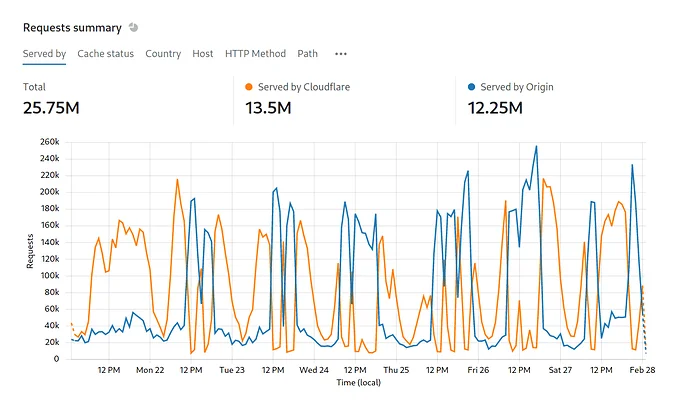
Every millisecond matters. Slow websites lose visitors, rankings, and revenue. Caching is one of the most effective ways to speed up your site—storing copies of content so it loads faster for everyone. Understanding caching helps you make smarter technical decisions.
At Proton Tech Lab, we optimize websites for speed. Let’s explore how caching works and why it matters.
What Is Caching?
According to Cloudflare, caching stores copies of files or data in temporary storage for faster access. Instead of generating pages from scratch every time, cached versions are served instantly. Think of it like keeping frequently used items on your desk rather than walking to a storage room each time.
Browser Caching
When visitors first load your site, their browser downloads images, stylesheets, scripts, and other files. Browser caching tells browsers to keep these files locally. On subsequent visits, browsers use stored copies instead of downloading again.
Proper cache headers tell browsers how long to keep files. Static assets like logos can be cached for months. Frequently changing content needs shorter cache times.

Server-Side Caching
Dynamic websites generate pages by querying databases and processing code. Server-side caching stores generated pages so they don’t need rebuilding for every request. This dramatically reduces server load and response times.
Page caching stores complete HTML pages. Object caching stores database query results. Both reduce the work servers must do for each visitor.
Content Delivery Networks
CDNs cache your content on servers worldwide. When someone visits your site, content comes from the nearest server rather than your origin server across the globe. Geographic proximity means faster delivery.
CDNs excel for global audiences. A visitor in Tokyo gets content from Tokyo servers, not from your server in New York. Distance affects speed; CDNs minimize distance.
Database Caching
Database queries take time. Database caching stores query results in memory for instant retrieval. When the same data is requested repeatedly, cached results serve faster than running queries again.
This particularly helps content-heavy sites where the same posts, products, or pages are requested thousands of times daily.
Cache Invalidation
Cached content can become outdated. When you update your site, old cached versions may persist. Cache invalidation—clearing or updating caches when content changes—ensures visitors see current information.
Good caching systems balance speed with freshness. Critical updates clear caches immediately; less urgent changes can wait for natural cache expiration.
What to Cache
Always cache: Images, CSS, JavaScript, fonts—static assets that rarely change.
Usually cache: Blog posts, product pages, static content pages.
Cache carefully: User-specific content, shopping carts, account pages.
Never cache: Real-time data, payment processing, sensitive information.
Implementing Caching
Most content management systems offer caching plugins. Hosting providers often include caching options. CDN services handle edge caching automatically. Implementation ranges from simple plugin installation to complex custom configuration depending on your needs.
Speed Up Your Site
Caching transforms website performance with relatively little effort. Properly configured caching makes sites load faster, reduces server costs, and improves user experience. If your site feels slow, caching should be among your first optimizations.
Need help speeding up your website? At Proton Tech Lab, we implement caching and optimization for faster sites. Contact us today to discuss your site speed. Let’s make it faster!